WeMAIdeStart a project ↗

AI / SOFTWARE

Custom AI software development

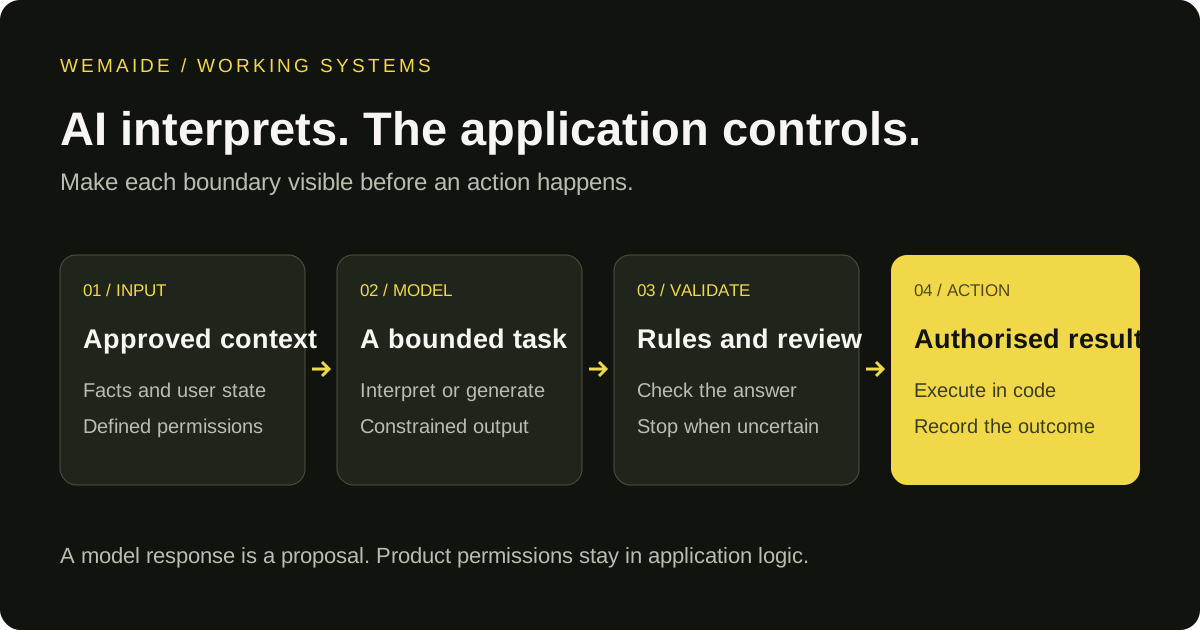
Custom AI software development and LLM integration for a specific user task. We build a new application or add AI to an existing product, connecting approved context, model output, application rules and a usable interface.

Versión en español ↗

OUTCOMEAI becomes one controlled component of a working product, not a promise attached to an empty interface.

AI / SYSTEM
AI
01DEFINEGoal + scope
02BUILDProduct system
03SHIPWorking release
01AI product design
02Context systems
03Model integration
04Structured outputs
05Human approval
06Local-first options

DELIVERABLES

What we build

Each engagement is scoped around the smallest complete system that can deliver the intended result.

01

Application or integration scope

For a new product, define the interface, user state and complete journey. For an existing product, define the API boundary and the one task AI should add. We agree on example inputs, expected outputs and acceptance checks first.

02

Knowledge and context layer

Approved facts, files, instructions and task context are separated so output can be inspected and corrected.

03

LLM and API integration

Connect the selected provider, prepare task-specific requests and validate returned structures before they affect product state. Timeouts, invalid responses and unsupported claims have explicit stop or recovery paths.

04

Working product and handoff

The interface shows what the model proposed and what the application actually did. Storage, permissions, approval where needed and operating documentation turn the model connection into usable software.

USE CASES

Where it fits

Good software starts with an operating need. These are common patterns, not fixed packages.

01

Content applications

Content Operator illustrates the complete product boundary: local source knowledge, six draft formats, review and supported publishing connections. Generation formats do not imply automatic publishing to every network.

02

Decision support

Combine deterministic scoring with contextual analysis without presenting model output as certainty.

03

AI inside an existing product

Add interpretation, classification or draft generation to an existing flow. Keep account permissions, record changes and consequential actions in application code rather than letting a model execute arbitrary instructions.

04

Specialized desktop tools

Local-first applications for workflows involving private files, credentials or operator-controlled actions.

PROCESS

From need to working release

One continuous path from product definition to build, validation and launch.

  1. 01

    Define the decision boundary

    Separate the business outcome from the parts where AI is genuinely useful.

  2. 02

    Design evidence and controls

    Establish approved inputs, output constraints, review steps and data handling.

  3. 03

    Build the complete workflow

    Connect the model to product state, storage, tools and a clear user interface.

  4. 04

    Test real failure modes

    Evaluate unsupported claims, stale approvals, malformed output and provider failures before expanding automation.

RELATED WORK

Relevant systems we have built

FAQ

Clear answers before we build

01Do you build complete applications or only AI integrations?+

We can design and build the complete product: interface, application logic, storage, AI integration and deployment path.

02Can the product use my own API key?+

Yes. A bring-your-own-credentials model can be used when it fits the product and the provider’s access rules.

03Can data remain on the user’s computer?+

Yes. Local-first storage is possible for desktop workflows. Any selected context sent for generation still reaches the configured AI provider.

04Can AI actions require approval?+

Yes. Approval-first operation is often the right starting point for external publishing, customer communication and other consequential actions.

05What do AI integration services include?+

Connecting a model to an existing product involves more than an API request: context selection, authentication, output validation, user states, error handling and an interface for the result. We confirm what the current application exposes before promising a connection.

06How is AI software different from workflow automation?+

AI software may be a complete user-facing application. Workflow automation primarily coordinates recurring steps between inputs and actions. They can share components, but the first-release scope and acceptance checks follow the actual user task.

07How do you evaluate quality before launch?+

Use representative examples, edge cases and tasks where the correct outcome is to stop or ask for review. Check output validity separately from whether the answer is useful, and validate recovery when the provider fails.

08What affects AI app development and integration cost?+

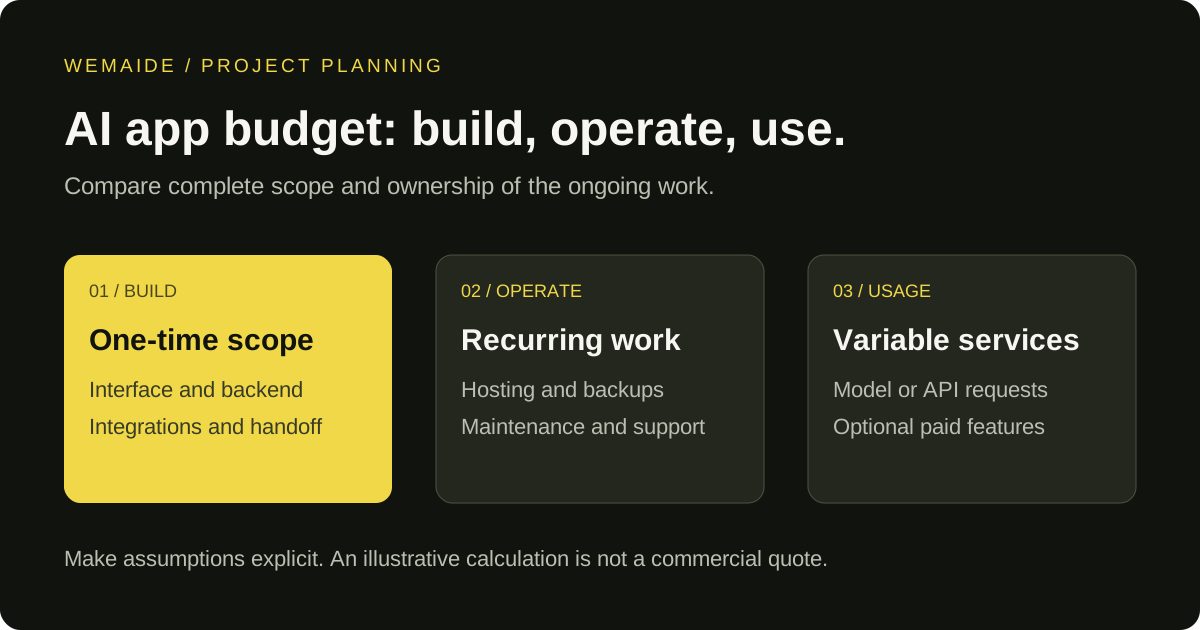
The estimate depends on the complete user task, existing API access, data preparation, interface and review states, evaluation, deployment and handoff. WeMAIde’s minimum project budget is USD 1,500; this is an engagement threshold, not a fixed price for a complete AI application. Model usage, infrastructure, external services and ongoing maintenance are budgeted separately. We define assumptions and acceptance checks before estimating the agreed scope.


RELATED INSIGHTS

Thinking behind the work

All insights ↗
Guides · 6 min

How to integrate AI into existing software: scope one useful feature

Plan an AI feature for your existing software: define the task, connect approved data, validate outputs and test the complete workflow before release.

Read insight ↗
Guides · 10 min

AI app development cost: budget the feature, the product and its operation

Estimate an AI application's build and running costs: scope, integrations, testing, model usage, maintenance and a transparent worked token-cost example.

Read insight ↗
Engineering · 11 min

Custom AI software vs off-the-shelf tools: when should you build?

A practical build-versus-buy framework for teams considering a custom AI application, workflow or internal system.

Read insight ↗
Engineering · 10 min

AI document processing: turn extracted fields into a reviewable workflow

Plan an AI document-processing workflow with source evidence, field validation, human review and controlled export. Includes a synthetic invoice example and review checklist.

Read insight ↗
Engineering · 11 min

Structured outputs vs JSON mode: from valid JSON to valid application data

Compare JSON mode, schema-constrained output and tool calling. Run an offline invoice example that separates parsing, shape checks and business validation.

Read insight ↗

START A PROJECT

Have a real product need?

Tell us what needs to work. We will come back with the clearest next step.

Discuss it in Telegram ↗