WEMAIDE / INSIGHTS / ENGINEERING
How a local AI video editor turns raw footage into an editable first cut
Inside a practical AI video editing workflow for Windows and macOS: local transcription, structured direction, editable timelines, subtitles and on-device export.
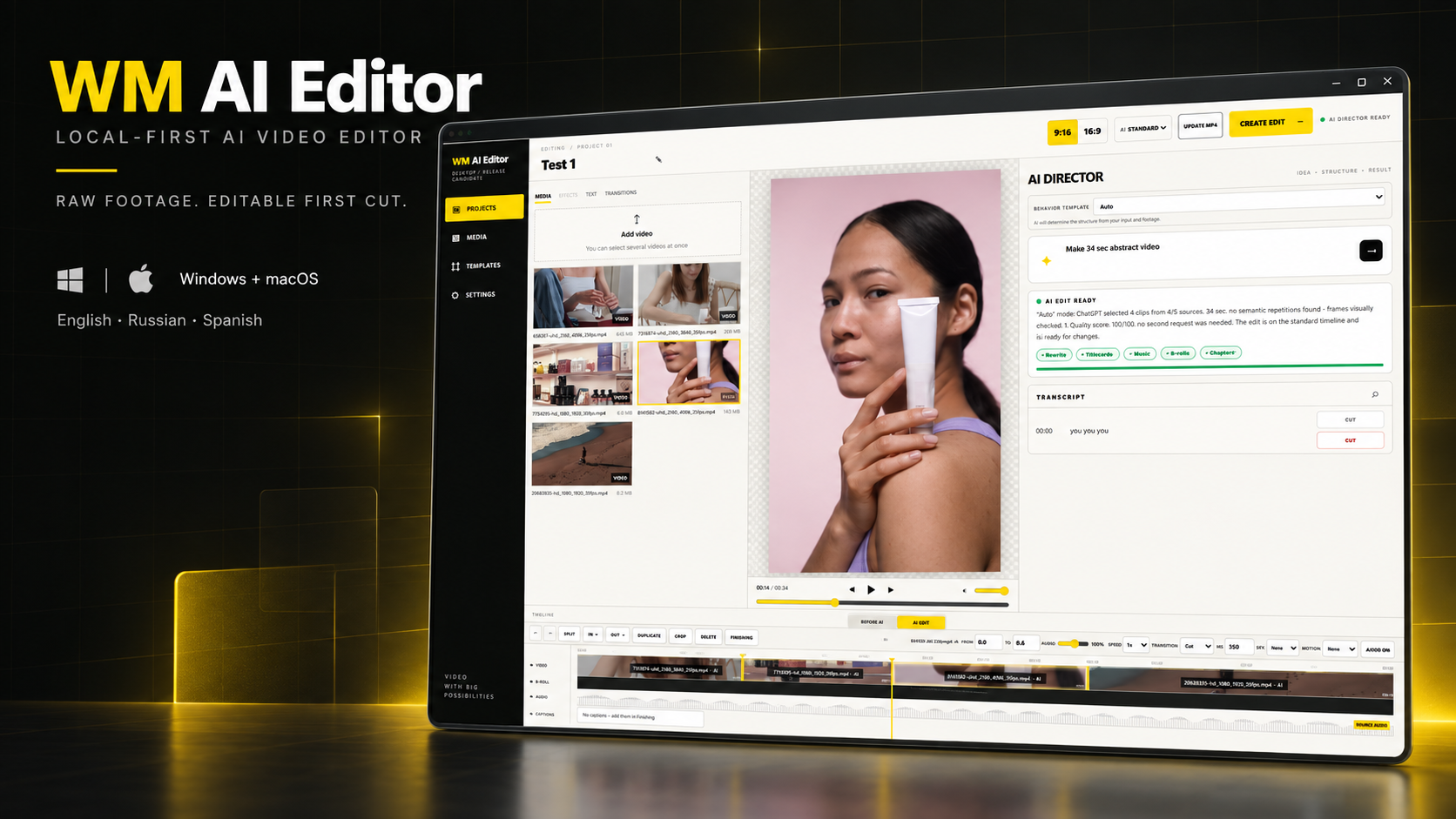
The useful promise of an AI video editor is not a mysterious one-click result. It is a faster path from unsorted footage to a first cut that a person can inspect, understand and change. That means the AI must help with decisions—what to keep, where to cut, how to frame and when to add context—without taking the timeline away from the creator.
We built WM AI Editor around that boundary. A creator imports one or several clips, describes the intended video in ordinary language and chooses a starting template or Auto mode. The software transcribes the material locally, prepares technical and semantic context, asks ChatGPT to act as a director, and turns the returned plan into an editable sequence. Rendering stays on the computer.
What an AI video editor should automate
The most expensive part of early editing is often not moving a clip on a timeline. It is reviewing everything, locating meaningful moments and deciding how the material should support the brief. An AI first-cut workflow can compress that work by aligning the request with transcripts, scene boundaries, timecodes and media metadata.
- Review several source files as one body of material.
- Find phrases, scenes and visual moments relevant to the brief.
- Suggest a sequence with explicit source timecodes.
- Generate editable subtitles from a local transcript.
- Select a vertical 9:16 or horizontal 16:9 framing strategy.
- Prepare a timeline that remains open to human revision.
AI should prepare the first cut. The creator should keep the final decision.
The architecture: director in the cloud, media work on the device
A video file is large, private and expensive to move. Sending complete source media to a model is unnecessary when the model’s job is to reason about structure. WM AI Editor therefore separates contextual direction from deterministic media operations.
raw clips → local analysis and transcript → structured context → AI edit plan → editable timeline → local MP4 exportChatGPT receives the task, transcript, timecodes, detected scenes and technical metadata. The desktop application keeps the original footage and performs the actual cuts, reframing, subtitle layout, audio work and rendering locally. Optional reduced key frames can be provided only through a separate permission when visual context is genuinely useful.
Why the result must stay editable
A fully generated video can be fast until the first wrong decision. If the model removes the best pause, chooses the wrong speaker or puts a subtitle across an important detail, a flattened result forces the user to regenerate or begin again. A normal timeline turns AI output into a starting point instead of a verdict.
The editor supports split and trim operations, B-roll, music, transitions, sound effects, speed control and undo/redo. Transcript edits can change the cut, while subtitle styling and placement remain visible. This is especially important for talking-head videos, tutorials and product demonstrations where small timing choices carry the meaning.
From horizontal source to TikTok, Reels and Shorts
Short-form platforms create a framing problem as much as an editing problem. A horizontal source may contain several people or important interface details, while a vertical output has far less room. WM AI Editor combines Fit and Fill controls with face detection, tracking and automatic crop suggestions so the creator can adapt a sequence rather than blindly crop its centre.
Ten templates and an Auto mode provide different starting rhythms, but the format is never locked. A project can target vertical 9:16 for TikTok, Instagram Reels and YouTube Shorts or horizontal 16:9 for YouTube and wider presentations.
Local speech recognition and subtitles
Speech recognition is part of the editing system, not a decorative final step. A local transcript gives the AI precise textual context and gives the creator a searchable representation of the recording. Subtitles can then be generated, corrected and timed without uploading the full video to a separate transcription service.
The product supports English, Russian and Spanish across the interface, local speech recognition and AI direction. Keeping those three layers aligned matters: the editor should understand the footage, the brief and the person operating the application in the same workflow.
Export should be boring and dependable
The final sequence is rendered locally to H.264/AAC MP4. GPU acceleration speeds up compatible systems, with a CPU fallback when hardware encoding is unavailable. The pipeline also accounts for common production inputs such as 4K material, variable frame rates and HDR sources. These details are less exciting than AI, but they determine whether an editor is a demo or usable software.
Who benefits from this workflow
- Creators producing recurring videos for TikTok, Reels, Shorts or YouTube.
- Experts and educators turning long recordings into focused explanations.
- Small businesses and product brands without a dedicated editing team.
- Travel, moto, cooking and lifestyle creators working with many source clips.
- SMM teams that need a quick first cut but still require approval and control.
Automatic video editing software is most valuable when it reduces review and assembly time while preserving a clear route to correction. The long-term opportunity is not to remove the editor. It is to let the editor begin with an informed, structured draft instead of an empty timeline.
See the product