
WEMAIDE / INSIGHTS / ENGINEERING
How to schedule Telegram bot messages in each user’s time zone
Design recurring Telegram bot messages with user time zones, daylight saving rules, persistent jobs, retries and restart recovery. Includes a worked example.
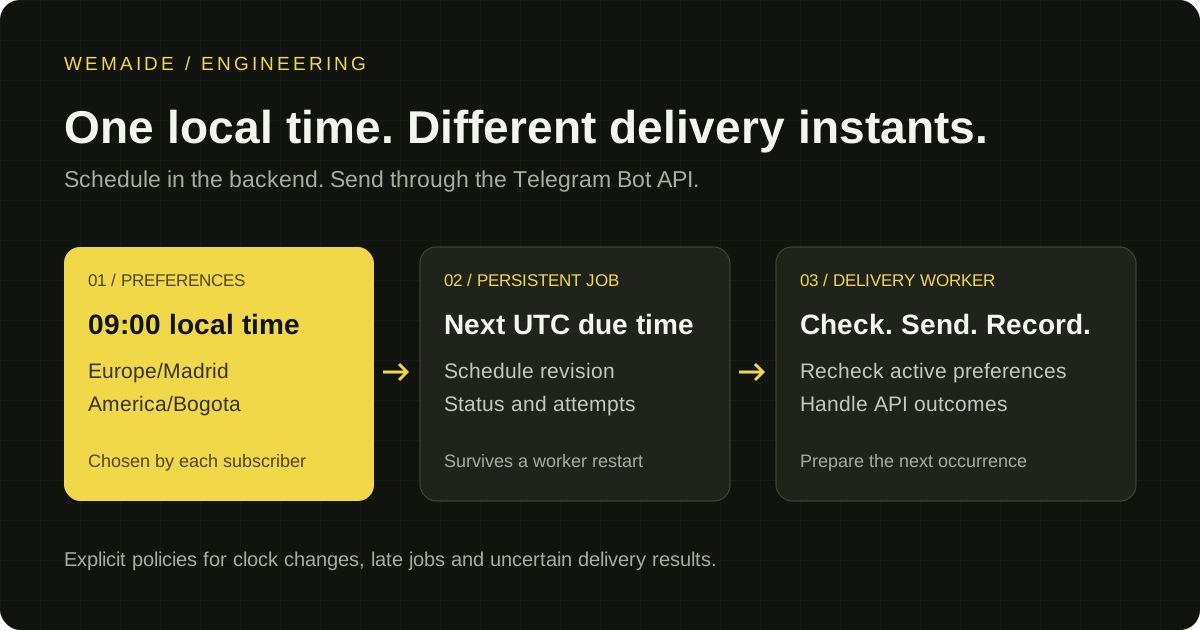
To send a Telegram bot message every day at a user’s chosen local time, store that preference in your backend, calculate the next delivery instant and let a worker send the due message. A single server-wide cron expression is not enough when different people expect the same local morning time.
This guide is for recurring private-chat reminders, lessons and content subscriptions using the HTTP Bot API. It describes an application design, not a ready-to-run library. We use our Horoscope product as a concrete example of personal daily delivery and distinguish its published features from the broader engineering recommendations below.
What Telegram handles and what your backend handles
The Bot API’s sendMessage method sends a message when called; its ordinary message parameters do not include a future delivery timestamp. Keep the schedule in your application. Telegram’s separate scheduled-messages documentation describes the client API, so do not treat that mechanism as an interchangeable Bot API parameter.
Ask for a local time and a time zone
Let a subscriber choose a delivery time and confirm a time zone. The Bot API User object has no personal time-zone field; a language code cannot reliably supply one. Show the current local time for the chosen zone so the user can spot an incorrect selection, and provide an easy way to change it after travelling.
For a product that follows regional clock changes, store an IANA zone such as Europe/Madrid rather than only a fixed UTC offset. A fixed offset can be a valid product choice, but it means something different: the delivery stays tied to that offset even when the subscriber’s local clocks change.
- Store chat identity, selected language, local delivery time, time-zone identifier and enabled or paused status.
- Store the calculated next delivery as a UTC instant for querying due work.
- Keep a schedule revision so a worker can reject a job made obsolete by a preference change.
- Provide pause, resume and time-change actions in the bot rather than requiring a support request.
Calculate the next local occurrence rather than adding 24 hours
For a daily local-time schedule, calculate the next calendar date and requested wall-clock time in the selected zone, then convert that occurrence to UTC. Repeating the previous UTC instant plus 24 hours can move the local delivery time when daylight saving rules change.
Define what happens to a time that does not exist during a spring clock change, or occurs twice during an autumn change. For example, shift a missing time to the next valid local time and use only the first occurrence of an ambiguous time. The precise policy is a product decision; implement and test it explicitly. A time-zone library supplies zone rules, while the application still owns the scheduling policy.
Worked example: 08:30 in Europe/Madrid
A subscriber requests 08:30 in Europe/Madrid. When the applicable offset is UTC+1, that occurrence is 07:30 UTC. At UTC+2, it is 06:30 UTC. Keeping the earlier 07:30 UTC instant as a recurring rule would deliver at 09:30 local time after the offset changes. Store the local preference separately from the UTC instant calculated for each occurrence.
| Record | Illustrative value | When it changes |
|---|---|---|
| Subscriber preference | 08:30; Europe/Madrid; enabled; revision 4 | When the subscriber edits the schedule |
| Occurrence | One local calendar date; UTC due time; content reference | For every intended edition |
| Attempt | Claim time; result; retry time or message identifier | For each delivery attempt |
Persist the job before attempting delivery
A scheduler should be able to reconstruct pending work after a restart. Store a delivery record with its subscriber, intended occurrence, content reference, due time, status and attempt history. Give each intended occurrence a unique identity so two scheduler passes cannot create the same job.
preference → next local occurrence → UTC due time → stored job
worker claims job → checks current preferences → sends message
API result → attempt record → next occurrence
If several workers run, claim each due job atomically with a lease or equivalent database mechanism. Recheck that the subscription is active and the schedule revision is current before sending. This handles concurrency inside your system; it does not make the external API call part of your database transaction.
Treat an uncertain API result differently from a failed job
On success, sendMessage returns a Message object; store its identifier with the attempt. A network timeout is harder: Telegram may have accepted the message even if your worker did not receive the response. Blindly retrying that attempt can create a duplicate. A local unique job key alone cannot guarantee exactly-once delivery through an external service.
Choose and document the tradeoff for uncertain outcomes. A daily digest may tolerate a missed edition better than a duplicate, while another notification may justify a controlled retry. Keep an explicit uncertain status and an operator path instead of labelling every timeout as safely retryable.
For flood-control responses, respect the returned retry_after value. Use a bounded retry policy for temporary failures and stop repeated attempts when the bot no longer has permission to contact the chat. Telegram’s broadcast guidance also means a large same-minute audience needs a queue, not a simultaneous burst.
A retry timeline the operator can inspect
Suppose an attempt receives HTTP 429 with retry_after=18. Eighteen seconds is an example response, not a fixed Telegram limit. Do not attempt again before that wait expires; then recheck the lease, subscription revision and lateness window. If the attempt instead times out without a definitive response, use the uncertain path: another send could duplicate a message Telegram already accepted.
| Observed outcome | Record | Recommended next action |
|---|---|---|
| Successful Message response | Sent, with returned message_id | Advance to the next intended occurrence |
| Flood control with retry_after | Retry waiting until the permitted time | Revalidate the job before retrying |
| Request outcome unknown | Uncertain | Use the product’s reconciliation or operator policy |
| Subscription paused or revised | Obsolete occurrence | Cancel obsolete work and recalculate from current preferences |
Suggested operator record, not an extract from the Horoscope database:
occurrence_id | subscriber_id | local_date | zone | due_at_utc
schedule_revision | status | attempt_count | next_attempt_at
telegram_message_id | last_error | updated_at
Keep the same business occurrence identity across retries. This helps control local duplicates and explain what happened; it does not guarantee exactly-once delivery through Telegram. The worked records and recovery policies above describe a proposed implementation, while the Horoscope case below states the features that are publicly substantiated.
Decide what happens after downtime
If the server resumes at noon, should an overdue morning message still arrive? Define a maximum lateness window. Within that window, send the pending edition; outside it, mark the occurrence as skipped and calculate the next one. Avoid sending several obsolete daily editions in a row after a long outage.
Show operators due, sent, retried, skipped, blocked and uncertain deliveries. Measure queue delay separately from the chosen schedule. A message accepted by the API is also different from a message the subscriber has read; do not present an API success log as proof of attention.
The Horoscope example: separate content preparation from delivery
WeMAIde’s Horoscope product delivers daily content at a selected local time across eight time zones, with Russian and Ukrainian content. Its nightly content pool prepares variants for twelve signs and five reaction types; PostgreSQL stores variants, schedules and logs. Admin commands and pause controls support ongoing operation.
The reusable idea is to prepare shared content before the delivery window, then select the appropriate variant for each subscriber. That keeps text generation out of the critical send path. The public case demonstrates these product features; it does not establish that every time-zone policy or retry mechanism recommended in this guide is part of that implementation.
Test the schedule before enabling the whole audience
- Two subscribers request the same local time in different zones: their UTC due times should follow the chosen zones.
- A subscriber changes zone or pauses after a job is queued: obsolete work must not follow the old preference.
- A clock moves forward or backward: apply the documented missing-time and repeated-time policy.
- The worker restarts or two workers claim the same occurrence: retain pending work and prevent concurrent duplicate attempts.
- Telegram returns a flood limit, a permission error or an ambiguous timeout: follow a distinct recovery path for each.
- The service resumes after an outage: apply the lateness window rather than replaying an entire backlog.
If the product only needs reminders and guided conversations, a bot may be enough. If subscribers must browse a catalogue or manage a complex calendar, a Mini App can provide the interface while the backend keeps the same scheduling responsibilities. Start with the user task and agree on what reliable delivery means before expanding the interface.