WEMAIDE / INSIGHTS / GUIDES
Telegram booking bot: availability, confirmation and recovery
Plan a Telegram appointment bot that distinguishes requests from confirmed bookings, controls slot conflicts and recovers calendar and notification failures.
A Telegram booking bot should turn a user's choice into an authoritative appointment record and a clear confirmation. Showing a list of times is only the interface. The backend must decide which slots are available, prevent conflicting reservations and preserve the result when a message, calendar request or worker fails.
The example here is a proposed consultation-booking flow, not a completed WeMAIde client case or a ready-made bot for sale. It helps scope a product before choosing a bot builder, custom backend or Telegram Mini App. No calendar provider is assumed to offer an atomic reservation operation unless its API actually documents one.
Distinguish a booking bot from a booking notification
| Product | Where the booking is made | What Telegram does |
|---|---|---|
| Telegram notifications for a scheduler | An existing scheduling service | Reports new, changed or cancelled appointments |
| Conversational booking bot | Bot steps backed by a booking system | Collects choices and displays the authoritative result |
| Telegram Mini App | A web interface inside Telegram | Opens the interface and may send permitted notifications |
| Enquiry-capture bot | An operator confirms availability later | Records a request; it should not claim the slot is booked |
For example, Koalendar documents Telegram notifications for events created in its scheduler. That is a different scope from offering and reserving appointments inside a conversation. Decide which job you need before comparing prices or adding an AI assistant.
Define the booking rules before writing the dialogue
- What can be booked: service, duration, staff member or resource, and any buffer time.
- When it can be booked: working hours, holidays, booking horizon and minimum notice.
- How the appointment is identified: booking reference, owner and current revision.
- What may change: cancellation deadline, rescheduling rules and operator overrides.
- Which system owns availability: an existing scheduler or your own authoritative booking store.
- What the customer is promised: immediate confirmation, a temporary hold or an enquiry awaiting a person.
A generic reminder interval or cancellation rule is not correct for every business. Record the chosen policy with the service rather than hiding it inside a prompt. The user should see the material conditions before confirming the appointment.
A complete flow for one consultation
- The user opens the bot and chooses a service and, where needed, a staff member.
- The backend returns currently available slots under the service rules.
- The user selects a time; the bot shows the service, local date, zone, duration and relevant conditions.
- On confirmation, the backend revalidates the request and attempts the authoritative reservation.
- The bot shows confirmed only after the booking operation is confirmed, with a stable reference and a way to view or cancel it.
- Calendar projection and notifications are tracked separately so their failure does not silently erase or duplicate the booking.
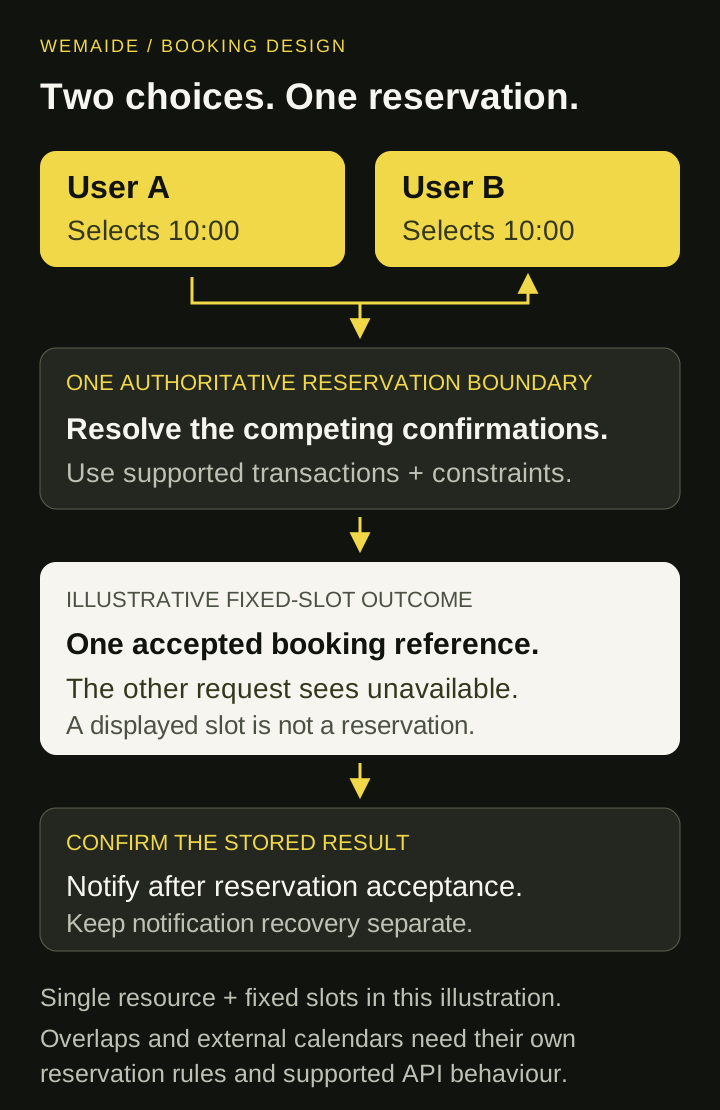
Two users can select the same displayed slot
Availability can change between display and confirmation. Checking a slot and writing a booking as unrelated operations creates a race. Use the booking system's supported reservation boundary, or a transaction and appropriate constraints in the authoritative store. The database design must match the scheduling model: a simple unique slot key is not enough for arbitrary overlapping intervals, several resources or variable durations.
| Moment | User A | User B |
|---|---|---|
| Display | Sees 10:00 as available | Also sees 10:00 as available |
| Confirm | One reservation is accepted under the authoritative rule | The same conflicting reservation is rejected or offered another slot |
| Notify | Receives the confirmed reference | Receives an honest availability change, not a false success |
Repeated delivery of one confirmation should refer to the same business operation. Two different appointments from the same user need different identities. Coordinate competing workers and retain the booking result before sending a confirmation message; a local deduplication flag by itself is not an external calendar guarantee.
Visual guide: two users, one booking slot
Choose one authoritative calendar model
If an existing scheduler owns bookings, use its supported availability and reservation operations. If your backend owns them, a calendar event can be a projection of an already confirmed booking. Document the consequence of a delayed or failed projection and give the operator a repair path.
Do not claim that an availability lookup followed by an unrelated calendar-event insert atomically reserves a slot. Independent calendar edits and writes from another system can conflict with your local view. Bidirectional synchronisation adds change detection, ownership, revision handling and reconciliation; it is a separate piece of scope.
Show the time zone in the confirmation
Store the appointment as an unambiguous instant with the intended zone and service context. Display the date and zone the user is agreeing to, especially when staff and customers are in different countries. A wall-clock time without a zone is not a complete appointment.
For reminders, retain one intended reminder identity per booking revision and reminder type. Rescheduling or cancelling should obsolete the old reminders. After downtime, use a documented lateness policy so several obsolete reminders are not sent together. Telegram API acceptance is also different from the customer reading the message.
Separate booking state from integration and notification state
| Observed situation | Retain | Recovery policy |
|---|---|---|
| Booking rejected because the slot changed | Request and rejection reason | Offer current alternatives |
| Reservation request timed out | Stable operation reference and uncertain result | Look up the authoritative result before trying another reservation |
| Booking confirmed, calendar projection failed | Confirmed booking and projection error | Repair or escalate the projection according to the chosen calendar model |
| Booking confirmed, Telegram response lost | Confirmed booking and uncertain notification attempt | Recover the notification deliberately; do not reserve another slot |
| Appointment cancelled or revised | Current booking revision | Obsolete old reminders and synchronise the new state |
Use a bot, Mini App or AI only where the task needs it
A short sequence of service/date/time choices can work with bot buttons. A dense calendar, several staff schedules or a complex form may justify a Mini App. Both need backend validation and record permissions. A Telegram identity does not authorise a person to view another customer's appointment.
AI can interpret a free-text enquiry or draft a helpful explanation, but fixed availability, reservation and cancellation rules should remain inspectable application responsibilities. When a request is ambiguous, clarify it before proposing a booking. The model should not invent an available slot or turn an unconfirmed enquiry into a confirmed appointment.
Acceptance checks for the smallest useful launch
- Two users confirm a conflicting slot concurrently: the result follows the authoritative reservation rule.
- One confirmation is replayed: the same booking reference remains recoverable.
- An external response is lost after acceptance: the system reconciles instead of blindly booking again.
- A user cancels or reschedules after a reminder was queued: obsolete reminders do not follow the old revision.
- The customer and staff use different zones: both see the intended appointment clearly.
- A user requests someone else's booking: ownership checks prevent disclosure.
- The integration fails: the operator can distinguish an enquiry, confirmed booking and uncertain operation.
If the first version only captures a request for a person to confirm later, launch and label it that way. That can be a useful smaller product. The important scope decision is what the bot can truthfully promise at the moment the customer presses Confirm.