WEMAIDE / INSIGHTS / GUIDES
Telegram bot Google Sheets integration: capture requests without blind retries
Plan a Telegram-to-Google-Sheets workflow with confirmed submissions, stable identifiers, controlled append retries and separate notification states.
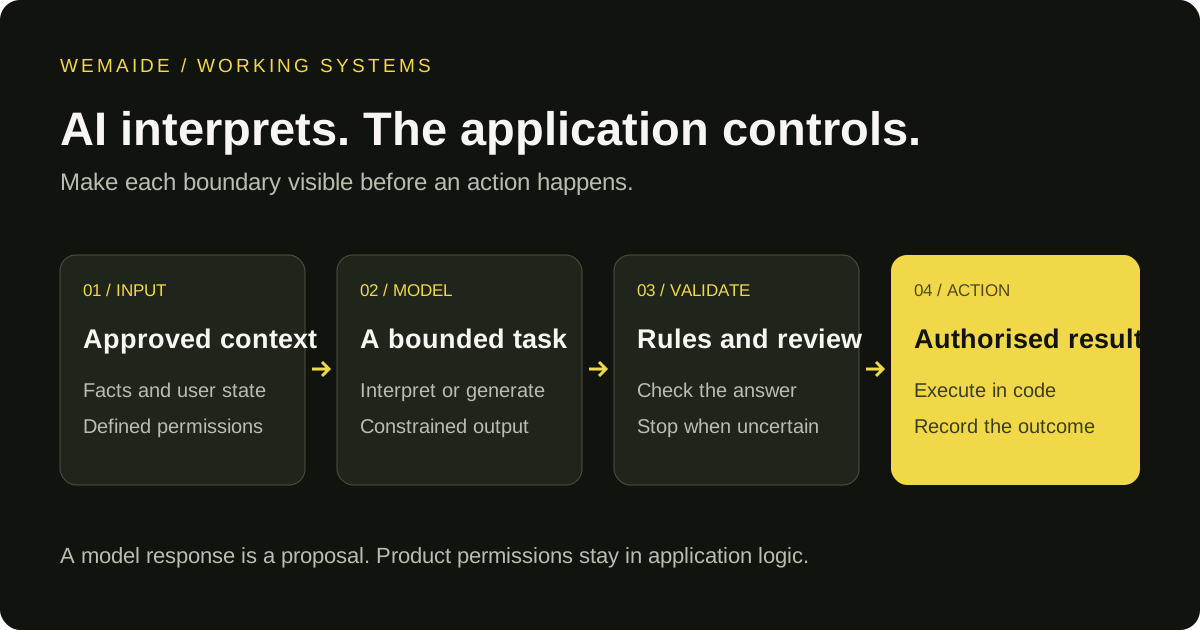
A Telegram bot can collect a request and append it to Google Sheets, but the useful result is more specific than a new row. The operator needs one recognisable submission, the user needs an honest confirmation, and a temporary error must not silently lose or duplicate the request. Define those states before connecting a trigger to an append action.
The example below is a proposed enquiry-capture workflow using synthetic data, not a claim that WeMAIde has deployed this exact Google Sheets connector for a client. It can be implemented with an integration platform or an application backend. The same acceptance checks apply to both.
Choose a connector or a backend before the first row
| Situation | Starting point | Verify before relying on it |
|---|---|---|
| A standard incoming message should create a row | Evaluate a supported connector in your existing integration platform | Current trigger, Google permission flow, field mapping, duplicate and error behaviour |
| Your application already owns confirmed enquiries and business state | Keep intake in the backend and write the agreed fields through the Sheets API | Durable submissions, supported credentials, RAW/input handling and uncertain writes |
| You want to inspect our reference without accounts | Run the downloadable offline Node.js demo below | It uses synthetic adapters; no real spreadsheet or Telegram connection is tested |
For a tiny synthetic example, the user confirms request type Booking and summary Consultation next week. The application records submission SYN-42, then appends that same confirmed submission. A second, genuinely different request needs a different reference. Do not use the person's chat ID alone as the submission identity.
Confirmed synthetic input
submission_id: SYN-42
request_type: Booking
summary: Consultation next week

Expected six-column row in the reference adapter's order
A submission_id: SYN-42
B received_at_utc: 2026-10-25T09:00:00Z
C request_type: Booking
D summary: Consultation next week
E chat_ref: synthetic-chat
F status: new

Confirm the sheet write before saying the request was recorded.Choose which direction the integration actually needs
| Direction | Example | Main design question |
|---|---|---|
| Telegram → Google Sheets | A user confirms a service enquiry in the bot | How do we identify and record one submission? |
| Google Sheets → Telegram | An operator changes a booking status and notifies a consenting user | Which change warrants a message, and who may trigger it? |
| Telegram → lookup in Google Sheets | A user asks for the status of their own request | How do we authenticate the user and restrict accessible rows? |
Do not give every bot user arbitrary spreadsheet search. A row can contain another person's contact information or internal notes. For a status lookup, bind the authenticated Telegram user to the specific submission they may access, and return only the fields intended for that user.
A concrete flow: capture one confirmed enquiry
- Explain what the bot collects and where the request will be recorded. Ask only for fields the operator actually needs.
- Collect the request type and a short description. Show a summary with Confirm and Edit actions.
- On confirmation, create a stable submission_id and save the confirmed payload in durable application storage.
- Queue a spreadsheet write for that submission. Record the append result or an uncertain outcome.
- Send the user an acknowledgement with the submission reference once the required recording step is confirmed.
- Track the acknowledgement independently so a failed Telegram send does not cause another spreadsheet append.
A single Telegram update_id is useful for detecting repeated delivery of that event, but a multi-step enquiry can involve several updates. Give the business submission its own identity. Two legitimate requests from the same person need two submission identifiers; using the user's ID as the only deduplication key would incorrectly suppress the second request.
Illustrative record, not real customer data
submission_id: enquiry-demo-0042
received_at_utc: 2026-10-21T09:00:00Z
request_type: Telegram booking bot
user_confirmed_summary: Need an appointment request flow
write_status: confirmed
sheet_reference: returned updatedRange
confirmation_status: pending

Store only the Telegram identity and contact fields required by the workflow.
Design a row that remains understandable after sorting
| Field | Purpose | Avoid |
|---|---|---|
| submission_id | Stable reference shared by the workflow and operator | Using the visible row number as the business identity |
| received_at_utc | Ordering and incident investigation | An ambiguous local timestamp without a zone |
| request_type and confirmed_summary | The task the person actually confirmed | Unnecessary conversation history |
| operator_status | New, in review, contacted or closed | Letting an external user choose internal control states |
| write and confirmation evidence | Explain whether recording and acknowledgement completed | Calling a timeout either success or safe failure without evidence |
Keep reliable delivery state in application storage or a durable integration state store. Spreadsheet columns can make status visible to an operator, but they should not be the only mechanism that coordinates concurrent retries. Protect the identifier column and agree which columns people may edit, rename or sort.
Understand what append does and does not guarantee
The Sheets API values.append method searches the supplied range for a logical table and appends after it. Specify the spreadsheet, intended tab and range, and valueInputOption explicitly. The response can provide an updated range that you record as evidence. A successful append does not itself enforce uniqueness of your submission_id.
For free-form user text, consider RAW input so values are stored as supplied rather than interpreted as a formula or date. If the workflow deliberately uses USER_ENTERED, validate and constrain the fields that receive interpreted values. Also test what happens when an operator adds an empty column, renames the tab or changes the table layout.
An append timeout is not proof that no row was written
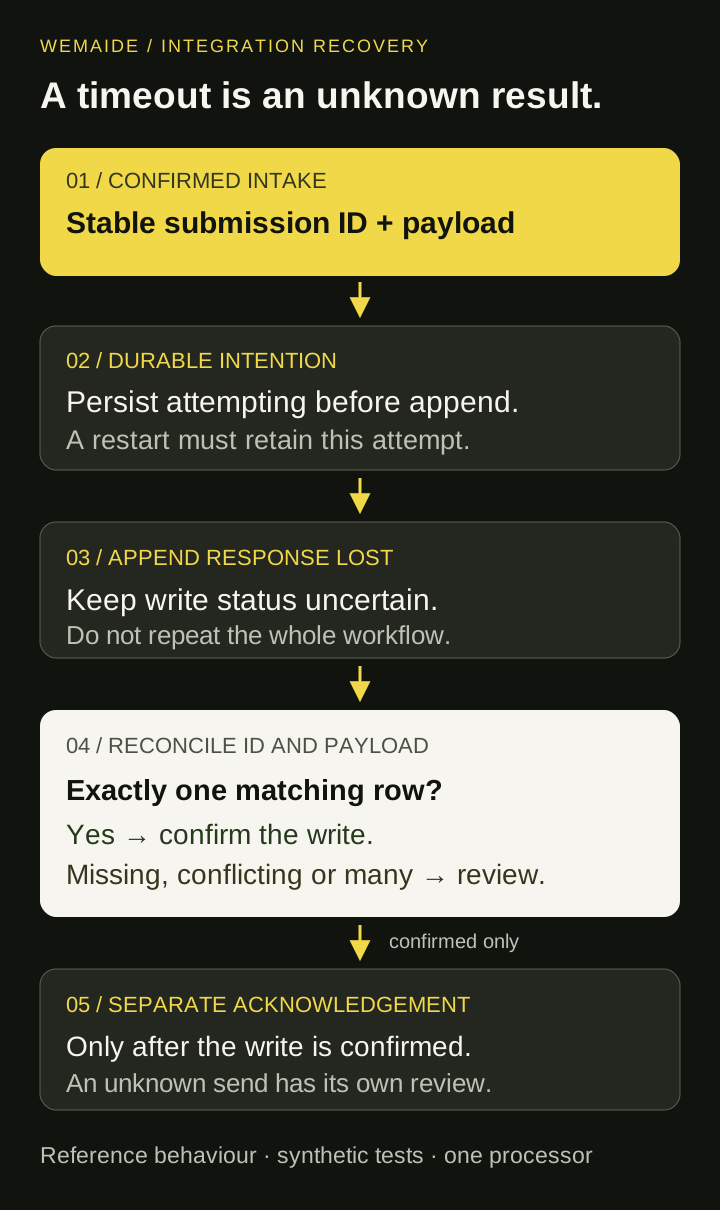
Imagine the spreadsheet accepts a row but the response never reaches your worker. A fresh append can create a second row. Mark the attempt uncertain and reconcile by the stable submission reference before deciding to retry. A simple check-then-append can also race if two workers do it at once; serialise or atomically claim the operation in your durable store.
This is duplicate control, not a guarantee of exactly-once writes across your database and Google Sheets. If uniqueness is business-critical, use a database with the required constraints as the system of record and treat the spreadsheet as an operator view. Keep a reconciliation queue for cases that cannot be resolved automatically.
| Failure | Keep | Recovery |
|---|---|---|
| A confirmed update is received again | The existing submission and intake identity | Return the existing state rather than creating a new enquiry |
| Sheets rejects access | Pending submission and actual error | Repair the intended account or file access, then retry deliberately |
| A quota or temporary error is returned | Attempt count and next eligible retry time | Use bounded exponential backoff according to the response and API guidance |
| The append outcome is unknown | Submission reference and uncertain attempt | Reconcile before another append; escalate unresolved cases |
| The row is confirmed but Telegram acknowledgement fails | Confirmed write evidence | Recover only the acknowledgement, applying the uncertain-send policy if needed |
The Sheets API has per-minute quotas; don't assume a working low-volume demo can absorb a burst. Queue requests, batch where appropriate, and observe retry delays. A transactionally applied Sheets request is different from a transaction that also covers Telegram and your own database.
Choose platform steps or a backend by operational needs
A platform connector can be enough for a small, linear workflow if it exposes the fields, credentials, error handling and durable state you need. A backend becomes useful when the bot has a multi-step conversation, ownership rules, several organisations, reconciliation or a shared business database. Neither option removes the need to inspect failed operations.
Give the integration only the intended spreadsheet access through the provider's supported credential flow. Keep service credentials on the server or in the platform's credential store, not in Telegram messages or a public Mini App. Decide who can read the spreadsheet, how long enquiries remain there and how corrections or deletion requests propagate to copies.
Visual guide: recovering an uncertain Sheets write
Run a small capture example with synthetic data
The downloadable Node.js reference makes the capture boundary executable. Its offline demo processes one confirmed enquiry, replays it, then processes a second legitimate enquiry from the same synthetic chat. The expected result is two rows and two acknowledgements. No account, credential, package installation or external API call is needed for that demo.
node telegram-sheets-reference.mjs --demo

Expected summary:
mode: offline-synthetic
first: confirmed
replay: confirmed
secondRequest: confirmed
rows: 2
messages: 2Node.js source with an offline demo, a single-worker processor, optional file storage and explicit Google Sheets / Telegram adapters. No embedded credentials.
The row schema, configuration boundary, reconciliation behaviour and checks needed before a real integration.
| Scenario | Expected and locally verified behaviour |
|---|---|
| Replay or concurrent calls in one processor | One row and one acknowledgement for the same unchanged submission |
| Another request from the same chat | A separate submission remains recorded |
| Append accepted, response lost | A later pass compares the matching row payload before confirming the write |
| No matching row, conflicting payload or multiple matches | Review is required; no blind repeat append or success message |
| Acknowledgement result unknown | The confirmed row is retained; the notification is not automatically repeated |
The tests exercise the processor and adapter contracts locally; a real Telegram/Google account round trip has not been performed. This is a reference for the integration boundary, not a complete chatbot. Your application still supplies confirmed intake, supported credentials, durable production state, bounded retries and an operator recovery procedure. The included file store is for one process and does not make external writes transactional or guarantee exactly-once delivery.
Acceptance checks before accepting real enquiries
- Replay one incoming confirmation: one business submission should remain recognisable without a second enquiry.
- Submit two different requests from one test user: both must be retained.
- Simulate a response lost after a spreadsheet write: the workflow must record uncertainty and reconcile.
- Remove write permission and rename the sheet tab: the request must remain recoverable rather than disappear.
- Fail only the Telegram acknowledgement: the already confirmed row must not be appended again.
- Sort rows and edit permitted operator fields: lookup by submission reference must still find the intended record.
- Attempt to request another user's status: the lookup must not reveal their row.
A useful handover includes the row schema, allowed edits, state transitions, retry limits and a short operator procedure for pending or uncertain requests. Those details make the integration usable after the person who built the first successful demo is no longer watching it.