
WEMAIDE / INSIGHTS / ENGINEERING
Telegram Mini App authentication: validate initData, then create your application session
Follow Telegram Mini App initData from client to backend. Includes an offline Node.js HMAC example, freshness checks, tampered-data tests and session boundaries.
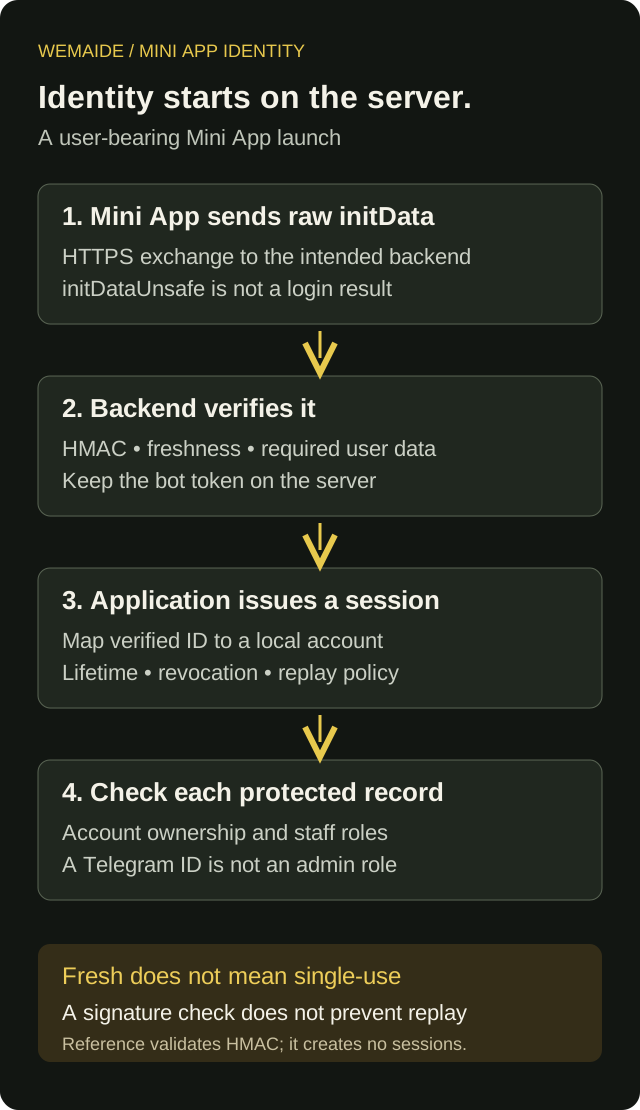
For a Telegram Mini App, send the raw Telegram.WebApp.initData string to your backend, validate it using the documented Telegram verification route, apply a freshness policy and then map the verified Telegram identity to an application account. Create your own session and check record permissions on every protected request. Client-side initDataUnsafe is not a trusted login result.
This guide covers a user-bearing Mini App launch and a bot-owned backend using HMAC validation. It is separate from Telegram Login for a website, MTProto client authorisation and Telegram Gateway verification. The included reference runs locally on synthetic data; it is not a deployed login service or a security audit.
Choose the authentication flow you are actually building
| Situation | Relevant starting point | Do not assume |
|---|---|---|
| A web interface opened as a Telegram Mini App | Validate raw Mini App initData on the server | A browser-supplied user object is already trusted |
| Sign in to an ordinary website with Telegram | Telegram's supported website login flow | Its payload and verifier are interchangeable with Mini App initData |
| Build a Telegram client using a user account | Telegram API user authorisation | A Bot API token creates a client account session |
Keep the raw string intact until server-side verification
Read Telegram.WebApp.initData in the Mini App and send that raw query string over HTTPS to the intended authentication endpoint. Do not rebuild it from initDataUnsafe, change a serialized user object or independently trust the user_id in a request body. Validate the received representation according to Telegram's algorithm. Treat initialization data as a credential-like value: do not place it in analytics, error screenshots or a public URL.
Verify the HMAC and freshness before trusting the user
- Parse the query fields without accepting duplicate keys. Extract the received hash and build the sorted data-check string from the other received fields.
- Derive the secret key with HMAC-SHA-256 using WebAppData as the key and the bot token as the message.
- Compute the data-check string's HMAC with that derived key and compare the fixed-size hash bytes using a constant-time comparison.
- Check auth_date against an explicit maximum age and future-clock tolerance, then parse the required user data.
- Resolve or create the application's own account under its onboarding policy; issue a session through the existing server authentication stack.
Keep the bot token on the server in the supported secret store. The supplied reference implements the bot-owned HMAC route. Telegram also documents an Ed25519 route for third parties that do not receive the bot token. Its data-check string is different: do not combine the two algorithms or copy exclusions from one into the other.
For the HMAC route, the reference removes hash and includes the other received fields, including signature if present. It does not reserialize JSON before hashing. The separate third-party route excludes both hash and signature and includes the documented bot-id prefix. Use a maintained verifier appropriate to the chosen route in a production integration and check its current contract.
Run a synthetic validation example without a Telegram account
The downloadable Node.js 22+ module has no dependencies and makes no network calls. Its demo signs invented data with a clearly synthetic token and verifies the result. It also rejects altered, expired and duplicate-field inputs. The example's five-minute maximum age, 30-second future tolerance and 16 KiB input cap are local teaching policies, not limits imposed by Telegram.
node mini-app-initdata-reference.mjs --demo

Expected summary:
mode: offline-synthetic
valid: accepted
tampered: rejected
expired: rejected
duplicate: rejected
sessionsCreated: 0HMAC and freshness validation plus an offline synthetic demo. No real bot token, session service or Telegram connection included.
Local tests also check a separately assembled HMAC fixture, the wrong token, percent-encoded values, missing user data, invalid hashes, oversized input, unsafe identity shapes and the freshness boundary. This demonstrates the small verifier's behaviour; a real supported Telegram launch and your session endpoint still require integration tests. Do not ship the synthetic fixture signer to a browser as an authentication feature.
A fresh signature is not a one-time login ticket
Freshness reduces the period in which old initialization data is accepted; it does not make a signed payload single-use. Someone who obtains a still-valid payload may be able to replay it. Protect the transport and storage, keep the exchange endpoint bounded and decide how your server handles repeated exchanges. If the product requires one-time consumption, implement that explicitly in shared server state rather than claiming auth_date prevents replay.
Return a session through the application's established authentication mechanism. A cookie-based implementation needs appropriate Secure, HttpOnly and SameSite settings for its actual embedding and navigation context, plus CSRF protection where relevant. Set a session lifetime, revocation path and renewal policy. Never choose an admin role from start_param, a client field or a model response.
Authorisation happens again when an order is opened
Illustrative server flow — not runnable endpoint code
POST /auth/telegram-mini-app
  raw initData → verify HMAC → enforce freshness
  → map verified Telegram ID to local account
  → issue application session through the auth stack

GET /orders/SYN-42
  validate session → load account
  → query order owned by that account or an allowed staff role
  → return only permitted fields
Knowing who the Telegram user is does not establish that they own order SYN-42. Bind protected reads and writes to the authenticated application account. A UI that hides an admin button does not protect the underlying route. Recheck permissions when the record changes, an employee role is removed or a subscription expires.
Handle launch modes and failures deliberately
| Condition | Response | What to avoid |
|---|---|---|
| Opened in a plain browser without usable initData | Explain the supported Telegram entry point or use a separately designed login | Inventing identity from URL fields |
| Invalid signature or changed fields | Reject authentication; retain a minimal diagnostic category | Falling back to initDataUnsafe |
| Expired initialization data | Ask the user to reopen through the supported launch flow | Ignoring freshness to make the demo pass |
| Valid identity, forbidden record | Return an access denial without revealing another customer's data | Treating all Telegram users as one account |
Initialization fields vary with the launch mode. This reference deliberately rejects a launch without a valid user field instead of pretending all entry points provide the same identity. Test the exact launch methods, devices and session behaviour your product supports before release.